

...
This picture shows what happens on the VM appdemo
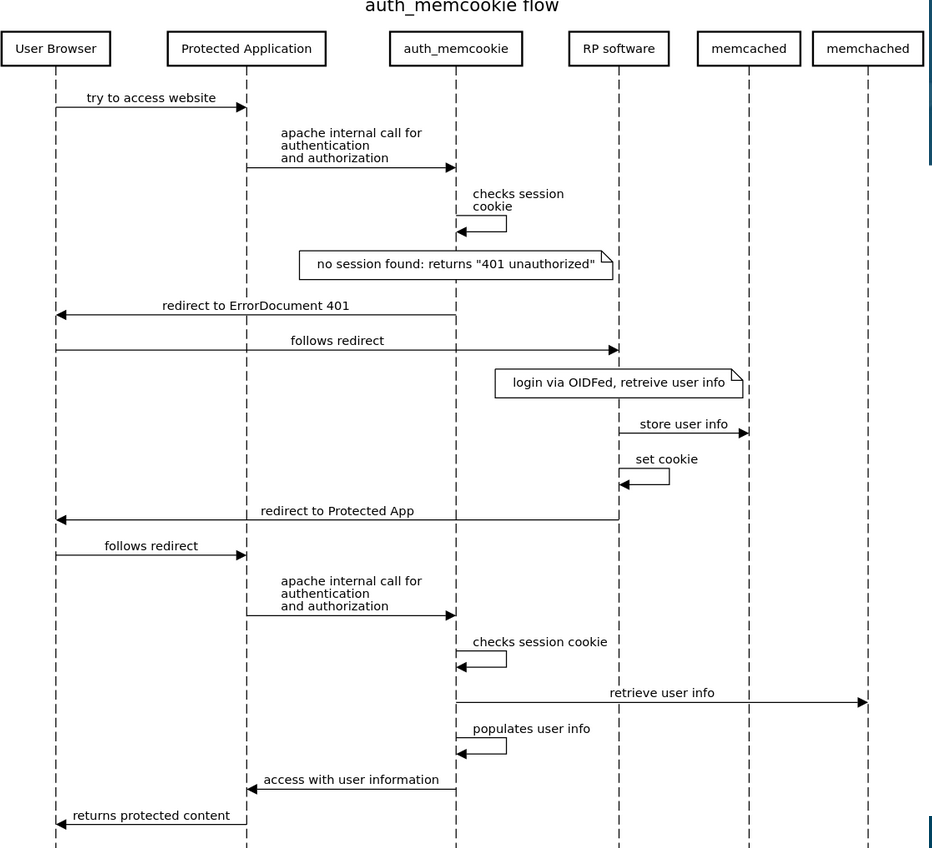
Instructions
appdemo
1) basic packages
First, get the some packages from the repositories
...
- the endoints of offa are proxied and reverse proxied, so that these paths are served by offa, while the rest is by the apache web server.
- by default, the site is publicly available, so that the landing pages work for unauthenticated users. The path /protected is protected by offa.
- the "unauthorized" error (401) page is set to be the login path of offa. This is how the authentication is initiated. By setting the ?next parameter, we can prescribe where the application should return after successful login. Unfortunately, we cannot dynamic valuse here, luckily, it is not needed usually.
Configure apache the following way in the virtualhost file: /etc/apache2/sites-enabled/000-default-le-ssl.conf
<IfModule mod_ssl.c>
<VirtualHost *:443>
# The ServerName directive sets the request scheme, hostname and port that
# the server uses to identify itself. This is used when creating
# redirection URLs. In the context of virtual hosts, the ServerName
# specifies what hostname must appear in the request's Host: header to
# match this virtual host. For the default virtual host (this file) this
# value is not decisive as it is used as a last resort host regardless.
# However, you must set it for any further virtual host explicitly.
#ServerName www.example.comServerAdmin webmaster@localhost
DocumentRoot /var/www/html# Available loglevels: trace8, ..., trace1, debug, info, notice, warn,
# error, crit, alert, emerg.
# It is also possible to configure the loglevel for particular
# modules, e.g.
#LogLevel info ssl:warnErrorLog ${APACHE_LOG_DIR}/error.log
CustomLog ${APACHE_LOG_DIR}/access.log combined# For most configuration files from conf-available/, which are
# enabled or disabled at a global level, it is possible to
# include a line for only one particular virtual host. For example the
# following line enables the CGI configuration for this host only
# after it has been globally disabled with "a2disconf".
#Include conf-available/serve-cgi-bin.conf<Location />
Auth_memCookie_CookieName offamemcache
Auth_memCookie_Memcached_Configuration --SERVER=127.0.0.1:11211# to redirect unauthorized user to the login page
ErrorDocument 401 "/login?next=/protected"# to specify if the module are autoritative in this directory
Auth_memCookie_Authoritative on
# must be set without that the refuse authentification
AuthType Cookie
# must be set (apache mandatory) but not used by the module
AuthName "OIDFED-AuthMemCookie"
Require all granted
</Location>#This is where the OIDFed stack is
#we need to pass through the user, otherwise there is a redirect loop
<Location "/login">
Require all granted
</Location>#This is the protected location of the application
<Location "/protected">
require valid-user
</Location>ProxyPass /.well-known http://localhost:15661/.well-known
ProxyPassReverse /.well-known http://localhost:15661/.well-knownProxyPass /login http://localhost:15661/login
ProxyPassReverse /login http://localhost:15661/loginProxyPass /redirect http://localhost:15661/redirect
ProxyPassReverse /redirect http://localhost:15661/redirectProxyPass /static http://localhost:15661/static
ProxyPassReverse /static http://localhost:15661/staticServerName oidfed-appdemo.incubator.geant.org
SSLCertificateFile /etc/letsencrypt/live/oidfed-appdemo.incubator.geant.org/fullchain.pem
SSLCertificateKeyFile /etc/letsencrypt/live/oidfed-appdemo.incubator.geant.org/privkey.pem
Include /etc/letsencrypt/options-ssl-apache.conf
</VirtualHost>
</IfModule>
...
Running as systemd service
Monitoring
ta-demo - lighthouse trust anchor
1) set up apache with letsencrypt certificates the same way as seen in offa, steps 1-3. (memcached packeges not needed)
2) download and compile lighthouse
cp /opt
wget https://github.com/go-oidfed/lighthouse/archive/refs/heads/main.zip
unzip main.zip
mv lighthouse-main/ lighthousecd lighthouse
go mod download
mkdir bin
go build -o bin/lighthouse github.com/go-oidfed/lighthouse/cmd/lighthouse
go build -o bin/lhcli github.com/go-oidfed/lighthouse/cmd/lhcli
3) create working folders
mkdir -p /opt/lighthouse/data
mkdir -p /var/log/lighthouse
4) configure lighthouse
cat << EOF > /etc/lighthouse/config.yaml
server:
port: 7672
logging:
access:
dir: /var/log/lighthouse
stderr: false
internal:
dir: /var/log/lighthouse
stderr: false
level: info
smart:
enabled: true
storage:
backend: json
data_dir: /opt/lighthouse/data
signing:
key_dir: /etc/lighthouse/keys
endpoints:
fetch:
path: /fetch
statement_lifetime: 3600
list:
path: /list
federation_data:
entity_id: https://oidfed-appdemo.incubator.geant.org/trust-anchor
federation_entity_metadata:
display_name: OIDFED-APPDEMO Trust Anchor
description: "A trust anchor in the GN5-2 TI Incubator"
EOF
5) enable the proxying in the virtualhost file
Add the following lines in the virtualhost file /etc/apache2/sites-enabled/000-default-le-ssl.conf anywhere within the virtualhost
ProxyPass /.well-known http://localhost:7672/.well-known
ProxyPassReverse /.well-known http://localhost:7672/.well-knownProxyPass /fetch http://localhost:7672/fetch
ProxyPassReverse /fetch http://localhost:7672/fetchProxyPass /list http://localhost:7672/list
ProxyPassReverse /list http://localhost:7672/list
6) startup
We need to start the process in a detached way (see note at offa in the previous section).
screen -S lighthouse /opt/lighthouse/bin/lighthouse
7) adding leafs with lhcli
TBA