

...
Please follow below guide after the tech team has cut the new release. You need to be authorized to push the image to docker.sunet.se, see this.
Build thiss-js
- git clone https://github.com/TheIdentitySelector/thiss-js
- git checkout <version-to-be-released>
- make docker && make docker_push_sunet
...
- sunet
Build thiss-mdq
- git clone git@github.com:TheIdentitySelector/thiss-mdq.git
- make
Beta deployment
Frontend (use.thiss.io)
...
To deploy <version> to beta (use.thiss.io)
- Clone the git repository in your computer (git@github.com:TheIdentitySelector/thiss-ops.git)
- Open
global/overlay/etc/hiera/data/common.yaml, check the 'max-age' under 'cache_control_beta'. If the current s-max age is 2 days or 172800 seconds, you need to change it to 10 hours, two days before the deployment. If it is one day, you need to change it to 10 hours exactly 1 day before. We need to do it so the old cache gets cleared from non-fastly cache nodes and new files are requested from our backend during the deployment. - Wait as long as the old 's-
max-age'and then proceed to the next step. You can even check in the 'developer tools' of your browser (e.g. Chrome, Firefox) that the response headers have the new s-maxage of 10 hours. You can try by using https://demo.beta.seamlessaccess.org/ - Update the
ds_version_betainglobal/overlay/etc/hiera/data/common.yaml.
...
- Run
git addglobal/overlay/etc/hiera/data/common.yamlgit commit. You should ofcourse have right to commit in the repository. - Run the script
thiss-ops/bump-tagafterwards. - To verify that the new version is installed, log in to the
servers static-1.thiss.ioand, static-2.thiss.io, static-1.aws2.thiss.io&static-2.aws2.sthiss.ioand enter 'run-cosmo -v'. - Restart the service by running the command
service sunet-thiss_js restart. - You You can check the status by running the command
service dockersunet-thiss_js status. - You can run
curl -k https://localhost/manifest.jsonto see that it shows current version and no errors. - You can also enter '
docker ps' in order to see if the new version is present on docker image tag. - We may have to do more than one version upgrade to make it backward compatible, check https://github.com/TheIdentitySelector/thiss-js/blob/staging/RELEASE.md
- Check that the login works using demo.beta.seamlessaccess.org. You can check the transaction check & page speed in Pingdom after each upgrade. Page speed shows the response headers and other information for each file loaded from https://use.thiss.io.
- It is also good to check the HIT ratio (
observability > service overview) and origin latency under CDN services from Fastly GUI for the service 'use.thiss.io'. Chek that the HIT ratio is high enough, should be around 98 to 99 percent, latency is way below 5 seconds. - After the verification step is done, everything looks good and open
global/overlay/etc/hiera/data/common.yamland change 'cache_control_betato original value after 10 hours have passed.
...
In order to rollback simply downgrade the version in cosmos-rules.yaml and follow the exact steps for committing and pushing the the changes to the git remote repo.
Backend (md.thiss.io)
- Clone the git repository in your computer (git@github.com:TheIdentitySelector/thiss-ops.git)
- Update the
versionunder thiss::mdq for both 'md-1.thiss.io' and 'md-2.thiss.io'
...
- Do git add global/overlay/etc/puppet/cosmos-rules.yaml and git commit. You should ofcourse have right to commit in the repository.
- Run the script thiss-ops/bump-tag afterwards.
- To verify that the new version is installed, log in to the servers md-1.thiss.io and md-2.thiss.io and enter 'run-cosmo -v'. You can check
- Restart the status
- service by running the command service docker-thiss_mdq status
- command
service sunet-thiss-mdq restart. - You can check the status by running the command
service sunet-thiss-mdq status. - You can run
curl -k http://localhost/to see that it shows right version, metadata information and no errors. - You can also enter 'docker ps' in order to see if the new version is present on docker image tag.
...
Simply undo the changes and go back to old changes and commit them in thiss-ops repository.
Production deployment
Frontend (service.seamlessaccess.org)
Frontend
The current whitelist needs to be checked with the master list before each deploy. Note that use.thiss.io does not do whitelisting which means the WHITELIST variable is not set.
To deploy <version> to production (service.seamlessaccess.org)
- Clone the git repository in your computer (git@github.com:TheIdentitySelector/thiss-ops.git)
- Open global/overlay/etc/hiera/data/common.yaml and check that the whitelist is right or change it if needed.
Warning title Whitelisting It is important to set the WHITELIST environment variable to the comma-separated list of the current whitelisted domains before deploying. Ask Marina or Leif to verify the list. The list is updated here Seamless Access Configuration Parameters.
- Open
global/overlay/etc/hiera/data/common.yaml, check the 's-maxage' under 'cache_control_prod. If the current s-max age is 2 days or 172800 seconds, you need to change it to 10 hours, two days before the deployment. If it is one day, you need to change it to 10 hours exactly 1 day before. We need to do it so the old cache gets cleared from non-fastly cache nodes and new files are requested from our backend during the deployment. - It is good to see that backends are not overloaded, you can check the HIT ratio (
observability > service overview) and origin latency under CDN services from Fastly GUI for the service 'service.seamlessaccess.org'. - Keep an eye on the transaction check in pingodm that it is not failing after lowering the
s-maxage. - Wait as long as the old 's-
maxage'and then proceed to the next step. You can even check in the 'developer tools' of your browser (e.g. Chrome, Firefox) that the response headers have the new s-maxage of 10 hours. You can try by using https://demo.seamlessaccess.org/ - Update the
ds_version_prodinglobal/overlay/etc/hiera/data/common.yaml.Code Block language bash ds_version_prod: '2.1.51' cache_control_prod: 'public, max-age=36000, must-revalidate, s-maxage=172800, proxy-revalidate'
- Run
git addglobal/overlay/etc/hiera/data/common.yamlgit commit. You should ofcourse have right to commit in the repository. Rungit add global/overlay/etc/hiera/data/common.yamlas well if whitelist is changed. You should ofcourse have right to commit in the repository. - Run the script
thiss-ops/bump-tagafterwards. - To verify that the new version is installed, log in to below servers and enter 'run-cosmo -v'.
static-1.aws1.geant.eu.seamlessaccess.org
static-1.aws2.geant.eu.seamlessaccess.org
static-1.ntx.sunet.eu.seamlessaccess.org
static-1.se-east.sunet.eu.seamlessaccess.org (have to run
service sunet-thiss_js restartmanually)static-2.aws1.geant.eu.seamlessaccess.org
static-2.aws2.geant.eu.seamlessaccess.org
static-2.ntx.sunet.eu.seamlessaccess.org
static-2.se-east.sunet.eu.seamlessaccess.org
You can check the - Restart the service by running the command
service sunet-thiss_js restart. - You can check the status by running the command
service docker sunet-thiss_js status.- You can run
curl -k https://localhost/manifest.jsonto see that it shows current version and no errors. - You can also enter '
docker ps' in order to see if the new version is present on docker image tag. - We may have to do more than one version upgrade to make it backward compatible, check https://github.com/TheIdentitySelector/thiss-js/blob/staging/RELEASE.md
- Check that the login works using demo.seamlessaccess.org. You can check the transaction check & page speed in Pingdom after each upgrade. Page speed shows the response headers and other information for each file loaded from https://service.seamlessaccess.org.
- It is also good to check the HIT ratio (
observability > service overview) and origin latency under CDN services from Fastly GUI for the service 'service.seamlessaccess.org'. Chek that the HIT ratio is high enough, should be around 98 to 99 percent and latency is way below 5 seconds.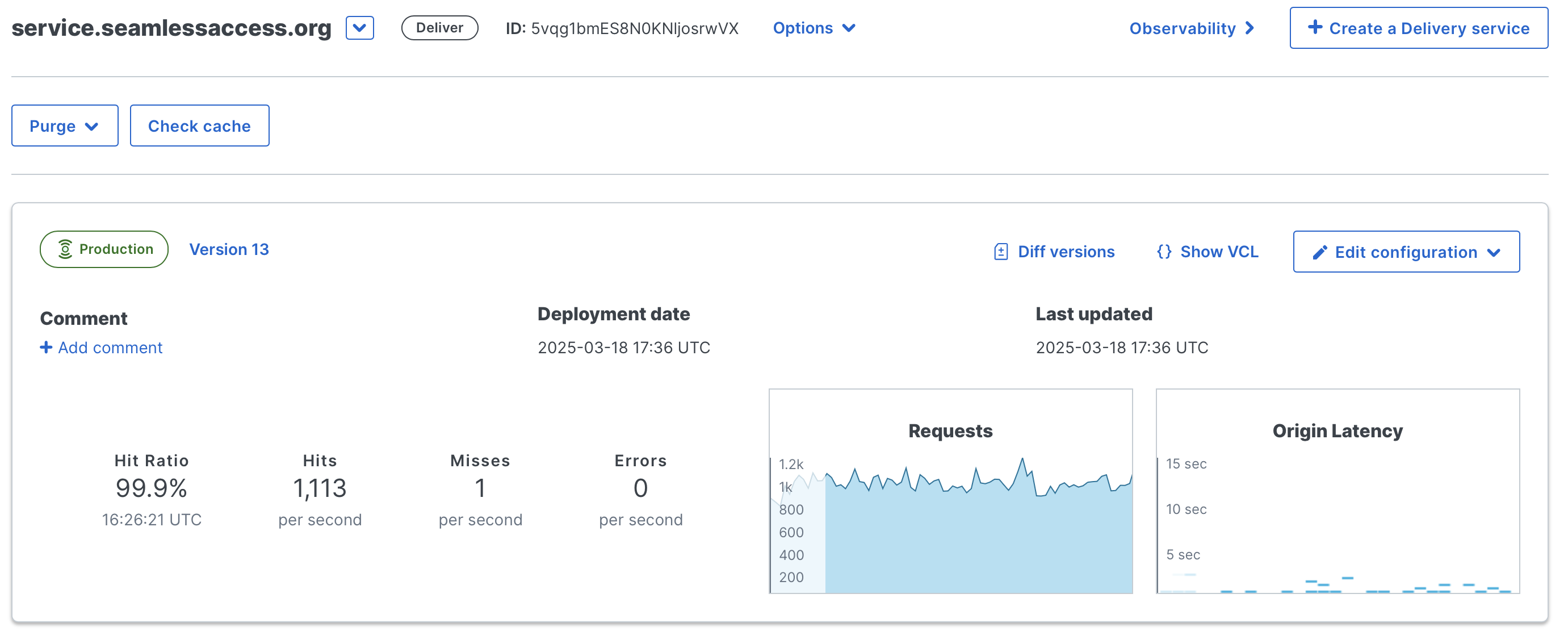
- After the verification step is done, everything looks good and few hours have passed, open
global/overlay/etc/hiera/data/common.yamland change 'max-age' under 'cache_control_prod'to original value.
...
- Clone the git repository in your computer (git@github.com:TheIdentitySelector/thiss-ops.git)
- Open global/overlay/etc/hiera/data/common.yaml and check that the whitelist is right or change it if needed.
Warning title Whitelisting It is important to set the WHITELIST environment variable to the comma-separated list of the current whitelisted domains before deploying. Ask Marina or Leif to verify the list. The list is updated here Seamless Access Configuration Parameters.
- Do git add global/overlay/etc/hiera/data/common.yaml as well if whitelist is changed. You should ofcourse have right to commit in the repository.
- Run the script thiss-ops/bump-tag afterwards.
- Log in to below servers and enter 'run-cosmo -v'. 'thiss-js' docker container should get restarted.
static-1.aws1.geant.eu.seamlessaccess.org
static-1.aws2.geant.eu.seamlessaccess.org
static-1.ntx.sunet.eu.seamlessaccess.org
static-1.se-east.sunet.eu.seamlessaccess.org
static-2.aws1.geant.eu.seamlessaccess.org
static-2.aws2.geant.eu.seamlessaccess.org
- You can check the status by running the command service docker-thiss_js status.
- Log into Fastly management web GUI https://manage.fastly.com/ and purge all cache for the service 'service.seamlessaccess.org' otherwise it will take the amount of seconds set in 's-maxage' in the static servers for the Fastly servers to fetch the updated JS page.
Verification
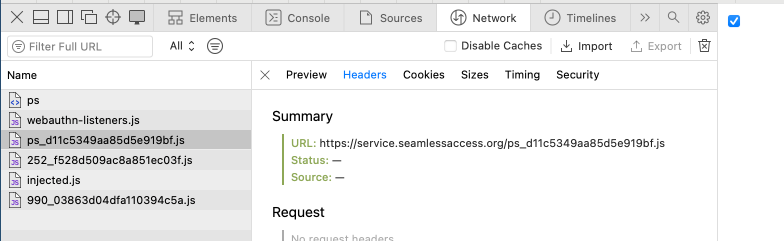
Visit https://service.seamlessaccess.org/ps.js should contain the new whitelisted domain. in browser and open the Developers tab. Find out the 'https://service.seamlessaccess.org/ps_<contetn hash>.js' link from the Network tab. That link should contain the new whitelisted domain(s). It may take a while to get updated depending on the age of the cache in your browser.
It is also good to check that the service is working by visiting https://demo.seamlessaccess.org.
Backend (md.seamlessaccess.org)
- Clone the git repository in your computer (git@github.com:TheIdentitySelector/thiss-ops.git)
- Update the
versionunder thiss::mdq for each site (ntx, se-east, aws1 and aws2)Code Block '^md-[0-9]\.ntx\.sunet\.eu\.seamlessaccess\.org$': thiss::dockerhost: thiss::mdq: version: 1.3.2 src: https://meta.ntx.sunet.eu.seamlessaccess.org/metadata.json base_url: https://md.seamlessaccess.org post: /usr/sbin/service docker-thiss_mdq restart - Do git add global/overlay/etc/puppet/cosmos-rules.yaml and git commit. You should ofcourse have right to commit in the repository.
- Run the script thiss-ops/bump-tag afterwards.
- To verify that the new version is installed, log in to below servers and enter 'run-cosmo -v'.
md-1.aws1.geant.eu.seamlessaccess.org
md-1.aws2.geant.eu.seamlessaccess.org
md-1.ntx.sunet.eu.seamlessaccess.org
md-1.se-east.sunet.eu.seamlessaccess.org
md-2.aws1.geant.eu.seamlessaccess.org
md-2.aws2.geant.eu.seamlessaccess.org
- Restart the service by running the command
service sunet-thiss-mdq restart. - You can check the status by running the command
service docker sunet-thiss_-mdq status.- You can run
curl -k http://localhost/to see that it shows right version, metadata information and no errors. - You can also enter 'docker ps' in order to see if the new version is present on docker image tag.
...