Welcome to this guide that explains how to set up a minimal federation, complete with guide on how to integrate an application that does not know oidfed/oidc.
In this guide all solutions are built on top of ubuntu 24.04 LTS server with packages and solutions from the official channels wherever possible; with the default system management tools such as systemd and the traditional system paths such as /etc and /opt. This should result in a setup that is familiar for many NREN operators and is easy to integrate with monitoring tools. This guide does not use docker, however, a dockerized solution should be relatively easy to derive from it; moreover several all elements (gorp/offa, lighthouse, ssp) are known to have docker version.
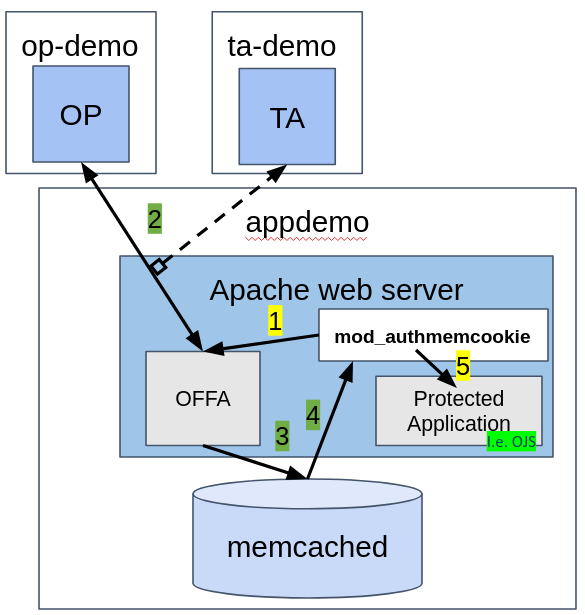
In this guide we are going to use three VMs that represent the three different sets of responsibilities:
the image below explains the main components in the three VMs.
This picture shows what happens on the VM appdemo
First, get the some packages from the repositories
apt install apache2
apt install memcached libmemcached-dev libmemcached-tool libevent-dev autoconf unzip
In this example we are enabling SSL with letsencrypt, obviously this step can be substituted with another certificate source
sudo snap install --classic certbot
sudo ln -s /snap/bin/certbot /usr/bin/certbot
sudo certbot --apache
3) enable apache proxy modules for integrating with offa
gorp-offa runs its own web endpoint that we will proxy with apache
a2enmod proxy
a2enmod proxy_http
In the case of authmemcookie, we have to get the source code and compile the apache module
wget https://github.com/ZenProjects/Apache-Authmemcookie-Module/tarball/master
./configure --with-apxs=/usr/bin/apxs --with-libmemcached=/usr/
Then, we have to register it as a module in apache by creating a file the following way
cat << EOF > /etc/apache2/mods-available/auth_memcookie.load
# Depends: authn_core
LoadModule mod_auth_memcookie_module /usr/lib/apache2/modules/mod_auth_memcookie.so
EOF
We have to enable the module
a2enmod auth_memcookie
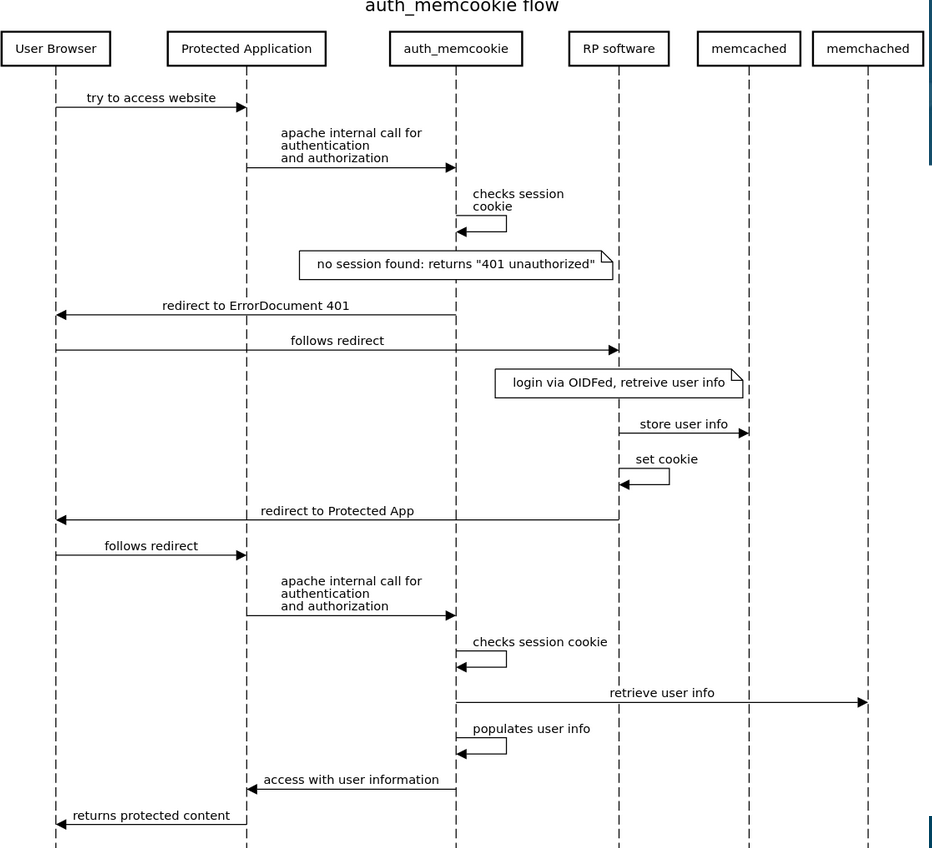
If all of the above runs without errors, we have achieved an apache instance with mod_auth_memcookie enabled.
At the time of writing, we can get offa by downloading the GO source and compiling.
We need a go compiler
sudo snap install --classic go
Get the offa source code and compile
cd /opt
wget https://github.com/go-oidfed/offa/archive/refs/heads/main.zip
unzip main.zip
mv offa-main/ offa
cd offa
go mod download
mkdir bin
go build -o /opt/offa/bin/offa github.com/go-oidfed/offa
This way we end up with an offa binary under /opt/offa/bin/offa
6) Prepare log and key directories
In this step we create the certificate and logging directories for offa
mkdir /var/log/offa
mkdir -p /etc/offa/key
7) Write the configuration
We will create the configuration file under the /etc/offa directory:
cat << EOF > /etc/offa/config.yaml
server:
  ip_listen: 127.0.0.1
  port: 15661
logging:
  access:
    dir: /var/log/offa
    stderr: false
  internal:
    dir: /var/log/offa
    level: debug
    stderr: false
    smart:
      enabled: true
sessions:
  ttl: 3600
  cookie_domain: oidfed-appdemo.incubator.geant.org
  cookie_name: offamemcache
  memcached_addr: localhost:11211
  memcached_claims:
        UserName:
            - preferred_username
            - sub
        Groups: groups
        Email: email
        Name: name
        GivenName: given_name
        Provider: iss
        Subject: sub
signing:
  key_storage: /etc/offa/keys
federation:
  entity_id: https://oidfed-appdemo.incubator.geant.org
  trust_anchors:
    - entity_id: https://oidfed-ta-demo.incubator.geant.org
  authority_hints:
    - https://oidfed-ta-demo.incubator.geant.org
8) Startup
since we want to run this service independent from our terminal, so that it keep running after we have signed out, we cannot just start it directly.
We have a few options.
We can start in screen
screen -S offa /opt/offa/bin/offa
Other options:
X) Other considerations
Key materials
At first startup, offa will create all the signing keys it needs both for OpenID federation (such as metadata) as well as OIDC. You can prevent that by manually creating the keys with commands like this.
cd /etc/offa/keys
openssl ecparam -genkey -name secp521r1 -noout -out federation_ES512.pem
This is really only needed if you want to have different parameters than the default.
log levels
in the config file above we enabled debug, which is a good way to see what is happening and get a sense of the system in the beginning. After a while you probably want to switch to info instead of debug
Running as systemd service
Monitoring