

Welcome to this guide that explains how to set up a minimal federation, complete with guide on how to integrate an application that does not know oidfed/oidc.
In this guide all solutions are built on top of ubuntu 24.04 LTS server with packages and solutions from the official channels wherever possible; with the default system management tools such as systemd and the traditional system paths such as /etc and /opt. This should result in a setup that is familiar for many NREN operators and is easy to integrate with monitoring tools. This guide does not use docker, however, a dockerized solution should be relatively easy to derive from it; moreover several all elements (gorp/offa, lighthouse, ssp) are known to have docker version.
Requirements
In this guide we are going to use three VMs that represent the three different sets of responsibilities:
- the Home Organization/OP (simplesamlphp), the role used to be 'IdP' in the SAML parlance.
- in this example the domain name of this VM is: oidfed-op-demo.incubator.geant.org
- A Trust Anchor
- oidfed-op-demo.incubator.geant.org
- a Relying Party component together with the web application
- oidfed-appdemo.incubator.geant.org
Architecture
the image below explains the main components in the three VMs.
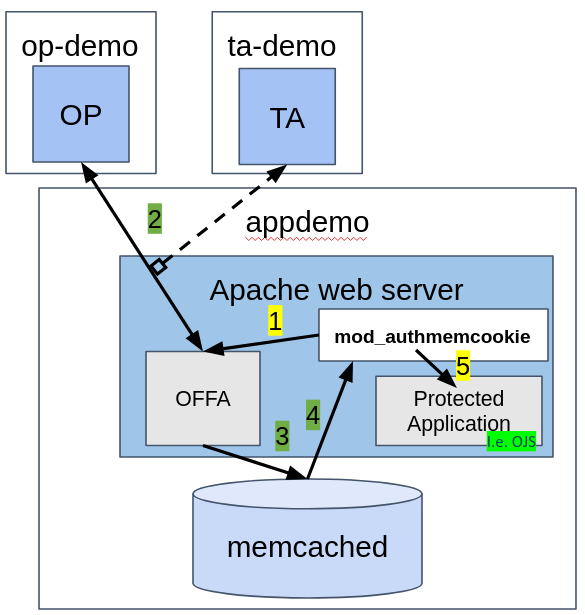
This picture shows what happens on the VM appdemo
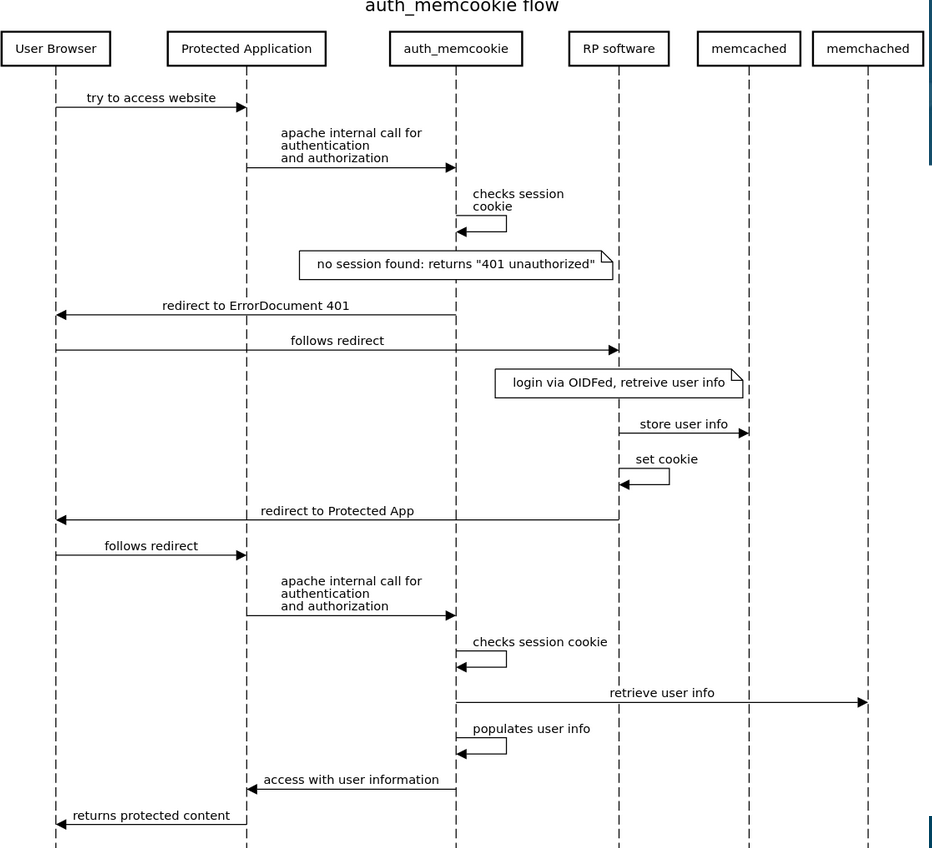
Instructions
appdemo
1) basic packages
First, get the some packages from the repositories
apt install apache2
apt install memcached libmemcached-dev libmemcached-tool libevent-dev autoconf unzip
2) SSL with letsencrypt
In this example we are enabling SSL with letsencrypt, obviously this step can be substituted with another certificate source
sudo snap install --classic certbot
sudo ln -s /snap/bin/certbot /usr/bin/certbot
sudo certbot --apache
3) enable apache proxy modules for integrating with offa
gorp-offa runs its own web endpoint that we will proxy with apache
a2enmod proxy
a2enmod proxy_http
4) get and compile auth_memcookie
In the case of authmemcookie, we have to get the source code and compile the apache module
wget https://github.com/ZenProjects/Apache-Authmemcookie-Module/tarball/master
./configure --with-apxs=/usr/bin/apxs --with-libmemcached=/usr/
Then, we have to register it as a module in apache by creating a file the following way
cat << EOF > /etc/apache2/mods-available/auth_memcookie.load
# Depends: authn_core
LoadModule mod_auth_memcookie_module /usr/lib/apache2/modules/mod_auth_memcookie.so
EOF
We have to enable the module
a2enmod auth_memcookie
If all of the above runs without errors, we have achieved an apache instance with mod_auth_memcookie enabled.
5) install gorp/offa
At the time of writing, we can get offa by downloading the GO source and compiling.
We need a go compiler
sudo snap install --classic go
Get the offa source code and compile
cd /opt
wget https://github.com/go-oidfed/offa/archive/refs/heads/main.zip
unzip main.zip
mv offa-main/ offa
cd offa
go mod download
mkdir bin
go build -o /opt/offa/bin/offa github.com/go-oidfed/offa
This way we end up with an offa binary under /opt/offa/bin/offa
6